CartSpy is an app for Shopify stores that shows each shopper as they add a product to their cart, reach checkout or complete an order: one cart at a time, with the products in it, while the shopper is still there. Each morning a short email sums up yesterday's carts.
★★★★★ 5.0 on the Shopify App Store · 7-day free trial · no code to add

CartSpy inside the Shopify app on your phone. Nothing extra to install.
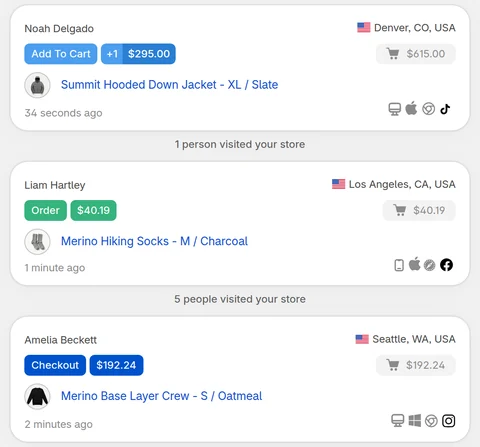
The Live View is a feed of your storefront, newest event first. Each line is one shopper doing one thing.
The product, the variant, the price and the shopper's location appear as soon as the item goes into the cart.
See when a cart turns into a checkout, and which carts get that far. The gap between the two is where most stores lose money.
The order lands in the same feed with its number, so you can follow one shopper from first add to paid order.
Traffic source, UTM campaign and search term sit on the cart, so a live cart from a paid campaign is visible as exactly that.
Open any shopper to see everything in the cart, what was removed, and the sequence that led there.
Bot sessions are separated out, so the live feed and the counts around it are people, not crawlers.
Three steps, nothing to paste into your theme.
Live cart tracking shows you the shopper who is on your store right now, with three products in their cart, deciding. CartSpy's morning email is the other half: yesterday's carts, checkouts and orders, added up and in your inbox before the day starts.
A product that gets added to carts all afternoon but never ordered is a broken variant, a shipping surprise, or a price that looks wrong next to the competition. In the live feed you watch it happen, cart after cart, and the next morning's email lists it among the products that got views but no orders.
Sessions from an ad are easy to count. Carts from an ad are what matter. Because the traffic source sits on each live cart, you can tell a campaign that brings buyers from one that brings clicks before the month's budget is spent.
Which products get paired, where shoppers hesitate, how long a cart sits before checkout. None of that is visible in totals. All of it is visible one shopper at a time.
When a cart does not make it, CartSpy keeps it with its contents. That is the abandoned cart analytics side of the app, and it is built from the same events as the live feed.
Reviews left on the CartSpy listing in the Shopify App Store.
Love this app. It helps you to understand which are the most viewed products and what people are adding to cart. It fills in the gaps with all of the info that Shopify’s analytics doesn’t give. I’ve recommended it to a few people who have also downloaded it.
Works well! Useful to see what prints people are liking.
Yes. Each add to cart, checkout and order appears in the Live View as it happens, and the Live View updates on its own while it is open.
No. CartSpy uses Shopify's web pixel, which is registered when you install the app. Your theme is not modified, and uninstalling leaves nothing behind.
Yes. Each cart shows its products, variants and prices, and you can open a shopper to see the full cart and how it changed.
Yes. Referrer, UTM campaign and search term are attached to the cart when they are known, and location is shown for every shopper.
Yes. The Live View is built for a phone as much as a desktop. It opens inside the Shopify app on your phone, like any other app you have installed in Shopify, so there is no separate CartSpy app to download.
Essential is $9.99 a month, Advanced is $19.99 a month and Pro is $39.99 a month. All three come with a 7-day free trial. See what each plan includes.
Install, and the live view fills as soon as someone adds to their cart. 7-day free trial, cancel any time.
Start free trial