Short answer: Yes: with CartSpy, an app for Shopify stores, you can see each add to cart as it happens, with the product and the shopper, while Shopify's Live View shows the number of active carts rather than what was added.
Live View shows how many sessions have an active cart in the last ten minutes, but not what was added, what the cart is worth or who added it. CartSpy shows every add to cart as it happens, one shopper at a time, and sums up yesterday's carts in a short email every morning.


Live View (Analytics > Live View) is Shopify's real-time screen. According to Shopify's help pages it shows:
It is free, built in and good for a quick pulse, especially on a busy sales day.
Shopify's reports do count sessions that added to cart, as one step of the conversion funnel. That is a daily total, not a live view of carts.
Shopify fires an event every time a shopper adds a product to the cart. Apps can listen to it through Shopify's web pixel, with no theme code. A live cart app turns those events into a feed.
That is what CartSpy's Live View is. Each add to cart appears as it happens, as a card with the product and variant, the price, the cart's running total, the shopper's city and country, their device, operating system and browser, and the traffic source that brought them. Checkouts and orders arrive in the same feed, so you can follow one shopper from the first add to the paid order.
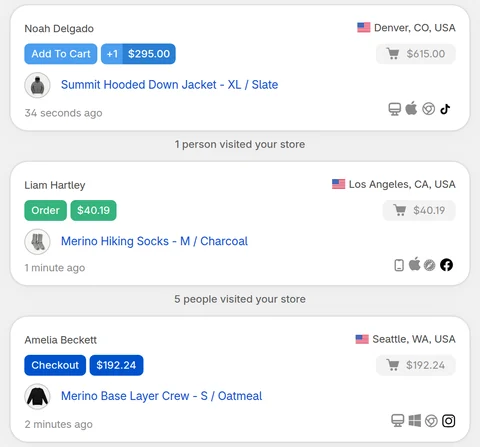
CartSpy is a feed you look at, not an alert system: it doesn't send a notification per add to cart. For a summary you don't have to watch, there is the daily email report. When a cart is left, it moves to the abandoned list with its products (see abandoned carts before checkout). More on the feed: live cart tracking. The listing: CartSpy on the Shopify App Store (apps.shopify.com/cartspy).
Partly. Shopify's Live View has an Active carts count: the number of sessions that added an item to the cart in the last ten minutes. It does not show which product was added, the cart's contents or the shopper.
Use an app that listens to Shopify's add-to-cart event. CartSpy shows each add to cart in its Live View as it happens, with the product, variant, price, the cart's total, the shopper's location, device and traffic source.
No. CartSpy is a live feed that updates on its own while it is open, on a computer or in the Shopify mobile app, plus a daily email each morning. It does not send a push message for each add to cart.
No. CartSpy uses Shopify's web pixel, which is registered when you install the app. Your theme is not changed.
Essential is $9.99 a month, Advanced is $19.99 a month and Pro is $39.99 a month. All three come with a 7-day free trial.
Yes. CartSpy shows each cart as it happens with the products in it, and the traffic source, UTM campaign, location and device of the shopper when they are known.
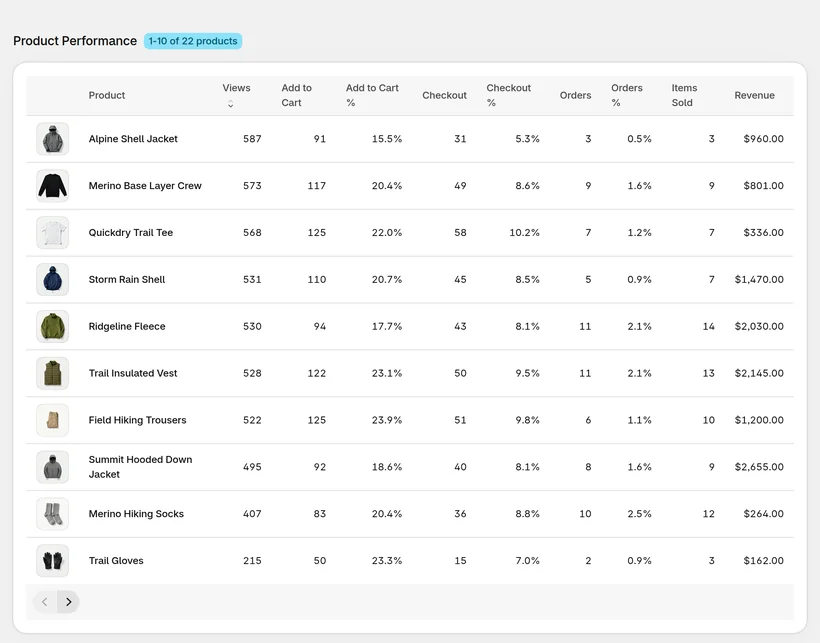
CartSpy's Product Performance report ranks every product by adds to cart, checkouts, orders and cart-to-order rate, so the products that are added often and bought rarely stand out.
Install, and the Live View fills as soon as someone adds to their cart. 7-day free trial, cancel any time.
Start free trial