Shopify Analytics is built around orders, sales and sessions and reports a store-wide add-to-cart rate, but not each shopper’s cart, live carts, the step where shoppers stop or abandoned carts that never reached checkout; CartSpy, an app for Shopify, adds those cart-side reports.
Shopify’s own analytics answers a lot: sales, orders, customers, sessions, conversion. The part it is not built to show is the cart, the minutes between “added to cart” and “checkout”. This page lays out which questions Shopify Analytics covers well and which need cart-level data.
★★★★★ 5.0 on the Shopify App Store · 7-day free trial · no code to add
For anything that ended in an order, Shopify is the source of truth, and CartSpy treats it that way.
These need events recorded as shoppers act, product by product and visitor by visitor, which is a different data source from the order and checkout records behind most standard reports.
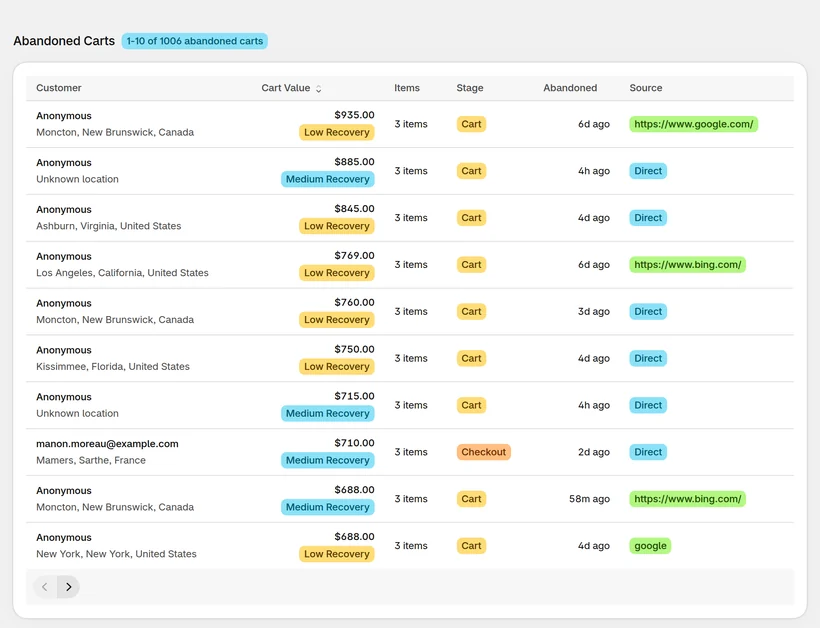
CartSpy is an app for Shopify that records the cart side: the live feed of visitors and carts, every abandoned cart with its products, product-level cart-to-order rates, the drop-off between cart and checkout, traffic-source cart quality, and a daily email. It sits next to Shopify Analytics. Use Shopify for what sold, and CartSpy for what happened on the way.
Visitors and carts as they happen.
The products in each, the stage reached, the source.
Cart-to-order per product, and the step where shoppers leave.
Yesterday’s carts, checkouts and orders each morning.
Related: abandoned cart analytics.
For the cart side, CartSpy shows live visitors and carts, abandoned carts with their products, product cart-to-order rates and traffic-source cart quality. Shopify itself remains the source for orders and sales.
CartSpy records the steps between add to cart and order, so you can see where shoppers stop, by device and by source.
Shopify only lists abandoned checkouts. CartSpy also keeps carts that never reached checkout, with their products and the stage reached.
Install, and the cart reports fill in as shoppers shop. 7-day free trial, cancel any time.
Start free trial