To see where shoppers leave between cart and checkout, use a cart analytics app such as CartSpy, which records how many shoppers reach contact information, shipping information and payment information, and splits the drop-off by device and traffic source.
Cart abandonment is usually reported as one rate. The useful question is where: on the cart, at the first checkout step, or at shipping and payment. CartSpy records each step, so you can see the step and the device or source that loses the most shoppers.
★★★★★ 5.0 on the Shopify App Store · 7-day free trial · no code to add
A rate says you are losing shoppers. It does not say at which step, and each step has a different fix. Leaving at the cart often points to price, shipping surprises or hesitation. Leaving right after checkout starts points to a form, a required account or a step that looks different from what was expected. Leaving at payment points to payment options and trust.
Shopify’s Abandoned checkouts list is helpful, but it starts at checkout, and only for shoppers who gave an email or phone number. Shoppers who left earlier are not in it, and neither is the question of where they stopped.
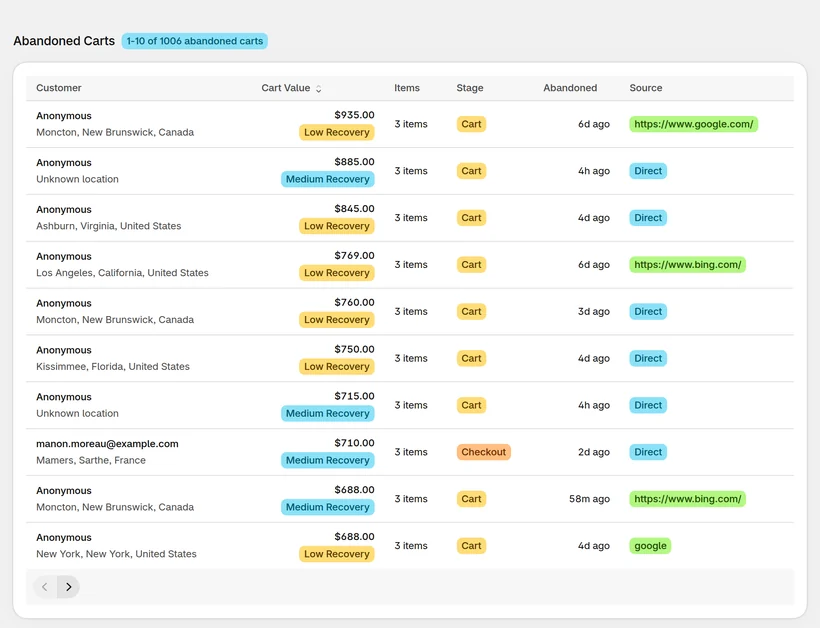
The drop-off screen shows how many shoppers reached each step (add to cart, checkout started, contact information, shipping information, payment information, order) and where they left, and it can be split by device and by traffic source. Each abandoned cart also records the stage reached, so you can open the carts behind a step.
Cart, checkout start, contact, shipping or payment.
The same funnel split by device.
The same funnel split by traffic source.
Related: abandoned carts before checkout covers who left; this page covers the step where they left.
CartSpy records add to cart, checkout started, contact information, shipping information, payment information and order, so you can see the step with the largest loss.
A single abandonment rate does not say why. CartSpy shows the step where each shopper stopped and the device and source behind it, which points to the fix.
Shopify only lists abandoned checkouts. CartSpy also keeps carts that never reached checkout, with their products and the stage reached.
Install, and the steps fill in as shoppers move through your store. 7-day free trial, cancel any time.
Start free trial