To see which products are added to cart but rarely bought, use a cart analytics app such as CartSpy, whose Product Performance report ranks every product by adds to cart, checkouts, orders and cart-to-order rate.
A product with many add to carts and few orders is telling you something: a price that changes at checkout, a shipping cost, a sold-out variant, or a page that promises more than the cart delivers. The first step is finding those products. CartSpy ranks them by cart-to-order rate.
★★★★★ 5.0 on the Shopify App Store · 7-day free trial · no code to add
Shopify’s reports are strong on what sold. Orders, sales by product and conversion over time are all there. What happens to a product that was added to a cart and not ordered sits in the part of the journey before checkout, so it takes a tool that records add-to-cart events per product.
With small numbers, a rate is noisy. A product added five times and never ordered is a prompt to look, not proof.
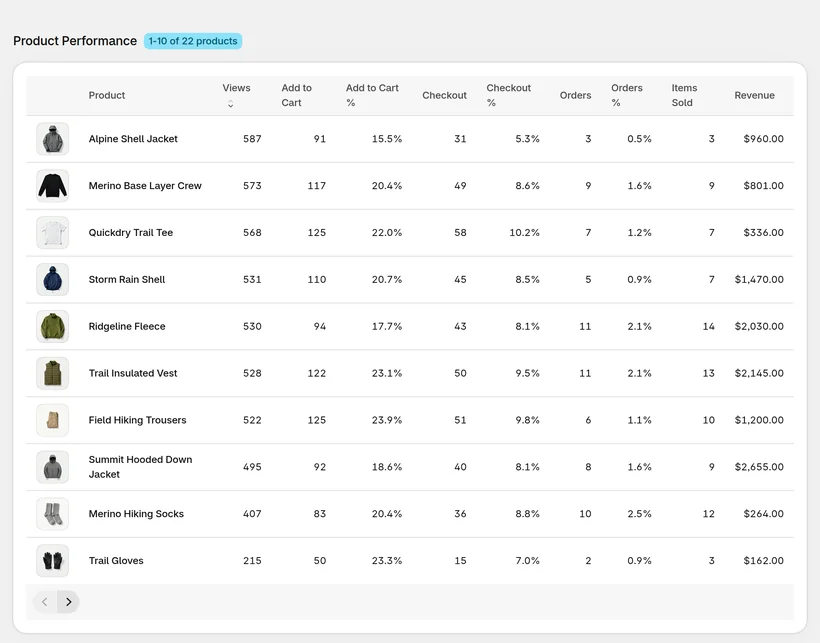
Open the product report (Product Performance) to see each product’s adds to cart, checkouts and orders side by side. Click a product to see the carts it appears in, including those that were abandoned, and the sources that brought them.
The products added most and ordered least stand out.
Open the abandoned carts that held the product.
See which campaigns fill carts with it and which ones close.
Related: abandoned cart analytics and add to carts live.
CartSpy does. Its Product Performance report lists each product's adds to cart next to its checkouts and orders, with the rate between them.
CartSpy keeps every abandoned cart with its products, the stage the shopper reached and the source that brought them. Shopify's Abandoned checkouts list starts at checkout.
Yes. CartSpy shows cart value and orders by traffic source and campaign, so you can see which sources fill carts that never close.
Install, and product rates fill in as shoppers add to cart. 7-day free trial, cancel any time.
Start free trial