Short answer: Judge an ad by what its visitors do in your store, not by its clicks. Tag every ad link with UTM parameters, read Shopify's marketing reports for the sales each campaign brings, and look at the steps before the sale: an ad whose visitors add to cart but never order needs a different fix than one whose visitors never add to cart.
CartSpy, a lightweight app for Shopify, lets you watch add to carts and orders come in live and see which source and campaign each one came from.


An ad works when it brings people who buy, at a cost you can afford. Your ad platform tells you the first half of the story: impressions, clicks, cost per click and the spend. Your store tells you the second half: whether those visitors looked at products, added to cart, checked out and paid.
Clicks alone can mislead. A cheap campaign with many clicks and no carts costs more than it looks, and a campaign with few clicks that fills carts may only need a better checkout to pay off.
utm_source (for example facebook or tiktok), utm_medium (for example paid) and utm_campaign (the campaign name) to each ad's URL. Most ad platforms have a URL parameters field for this.| What the ad's visitors do | What it usually means |
|---|---|
| They land and leave, few product views | The ad and the landing page do not match. Send clicks to the product the ad showed. |
| They view products, few adds to cart | The audience is curious but not convinced: targeting, price or the product page. |
| They add to cart, few checkouts | The ad works; the cart does not. Look at shipping costs and the order total. |
| They start checkout, few orders | Look at the checkout steps and payment options, often on mobile. |
| They order | Compare revenue with spend to see if it pays. |
If a campaign brings plenty of traffic and no sales at all, see getting traffic but no sales on Shopify.
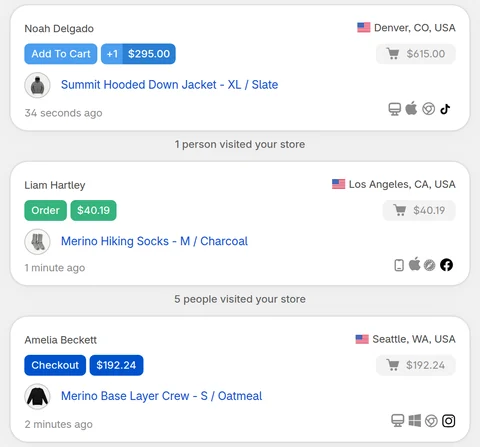
CartSpy is a lightweight app for Shopify that you glance at to watch add to carts and orders come in live, and see where each one came from. When a campaign is running, keep it open on your phone or desktop: each add to cart shows the product, the shopper's location and the source or campaign that brought them, and the order when it lands. It reads the UTM parameters and referrer of each visit through Shopify's web pixel, so it works with any ad platform and adds no theme code.

For a longer view:
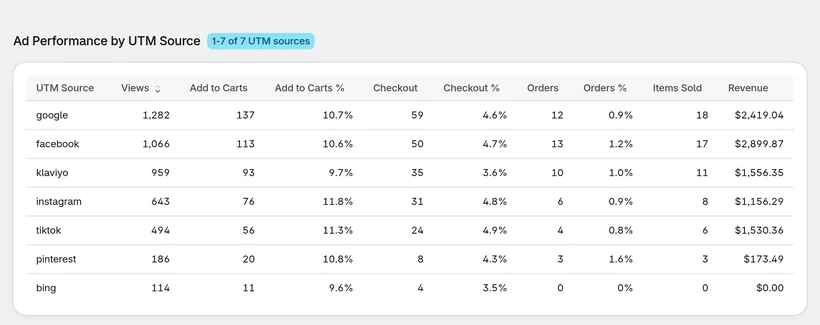
More on comparing sources: which traffic source brings buyers, not just visitors. The listing: CartSpy on the Shopify App Store (apps.shopify.com/cartspy).
Look at what the ad's visitors do in your store, not only at clicks. Tag each ad link with UTM parameters, then compare each campaign's visitors by adds to cart, checkouts and orders, and its sales against what you spent. An ad that brings carts but no orders needs a different fix than an ad that brings no carts.
Yes. Shopify's marketing reports, such as Performance by marketing channel and Performance by marketing campaign, show sessions, orders and sales by channel and campaign, with first and last interaction and other attribution models. Find them under Analytics > Reports, filtered by the Marketing category.
Check how far those visitors get. If they do not add to cart, the landing page or the product does not match the ad. If they add to cart but do not check out, look at price and shipping costs. If they start checkout but do not pay, look at the checkout steps and payment options. Also rule out bot clicks.
They count differently. Ad platforms credit sales by their own rules, for example within a set number of days after a click or a view, while Shopify reports credit sales by the visits it recorded and the attribution model you pick. Compare trends within one tool rather than totals across tools.
They make every report clearer. With utm_source, utm_medium and utm_campaign on each ad link, Shopify and CartSpy can group visits, carts and orders by the exact campaign. Without them, visits are grouped only by referrer, or show as direct.
Yes, with any ad platform. CartSpy reads the UTM parameters and the referrer of each visit from the storefront, so you see add to carts and orders come in live from Meta, Instagram, TikTok, Google, Pinterest or email, each with its source and campaign.
No. CartSpy shows the add to carts and orders each source and campaign brings, live and as a ranking by carts and orders. Ad spend stays in your ad platform, so divide a campaign's revenue by its spend there to get its return.
Install, and every add to cart and order shows up live with the source and campaign that brought it. 7-day free trial, cancel any time.
Start free trial