Short answer: Traffic without sales means visitors stop at some step before they pay. First rule out bots, because automated sessions add visits that never buy. Then find the step where real visitors stop (product page, cart, checkout or payment) and which traffic source and products it happens with, because each step has a different fix.
A quick way to see whether real visitors add anything at all: CartSpy, a lightweight app for Shopify, lets you watch add to carts and orders come in live, with the product and where each shopper came from.


Before changing your store, check that the visits are people. Search engines, link previews, price trackers and monitoring services all visit online stores, and some of them load pages the way a browser does. Those sessions count as traffic and never buy.
Shopify's bot classification is designed to be cautious, so some automated traffic can still be counted as human. If carts and checkout starts jump while orders stay flat, see are bots inflating my add-to-cart numbers?
Every sale passes the same steps: a product view, an add to cart, checkout, payment and the order. Traffic with no sales is stuck at one of them. The step tells you where to look.
| Where visitors stop | What it usually points to | What to check |
|---|---|---|
| They land and leave without viewing a product | The visit does not match what the ad or link promised | The landing page of each source; send ad clicks to the product they saw |
| They view products but rarely add to cart | The product page does not convince | Price, photos, reviews, sizes and stock on the products they view most |
| They add to cart but do not start checkout | Something in the cart makes them hesitate | Shipping costs, the order total, and trust signals in the cart |
| They start checkout but do not pay | A checkout step or payment option | Which step they stop at, on which device, and which payment methods you offer |
Shopify Analytics gives you the totals for these steps: sessions, sessions with cart additions, sessions that reached checkout and sessions that completed checkout. The Abandoned checkouts list (Orders > Abandoned checkouts) adds the shoppers who entered an email or phone number at checkout. Carts left before checkout are counted but not listed; see where to see abandoned carts in Shopify.
CartSpy is a lightweight app for Shopify that you glance at to watch add to carts and orders come in live, and see where each one came from: the traffic source or campaign, with the product and the shopper's location. Keep it open on your phone or desktop for a day and the plain questions answer themselves: are real visitors adding anything to cart at all, and which sources bring carts rather than just visits. No theme code is added.

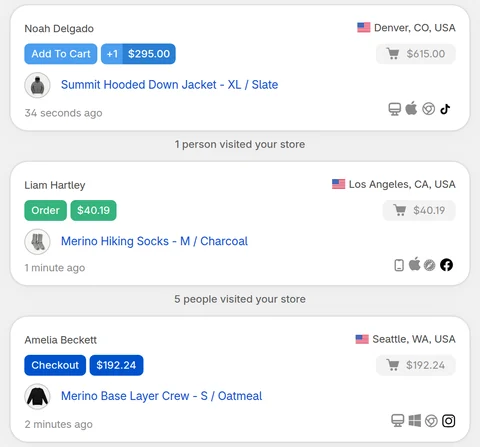
Alongside the live view:
You can also ask CartSpy questions in Sidekick, the assistant in your Shopify admin, or in Claude and ChatGPT, for example "which products were added to cart but not ordered this week?" or "which campaign brings carts but no orders?". The answers come from your store's CartSpy data and link back into the app.
CartSpy keeps data from the day you install it; it cannot show visits from before that. The listing: CartSpy on the Shopify App Store (apps.shopify.com/cartspy).
Visitors are stopping at some step before they pay. First make sure the traffic is real, because bot sessions add visits that never buy. Then find the step where real visitors stop: product page, add to cart, checkout or payment, and which traffic source and products it happens with. Each step points to a different fix.
Look at how far visitors get. If they rarely add to cart, the traffic or the product page does not match what they came for. If they add to cart but do not check out, look at price, shipping costs and trust. If they start checkout but do not pay, look at the checkout steps and payment options.
Some of it may be automated. Shopify labels each session as human or bot, filters identified bot sessions out of session reports by default since its September 2026 update, and lets you check with the Human or bot session filter in reports that support it. Many sessions from one data-center city with no carts are a common sign of automated visits.
In Shopify Analytics, reports such as Sessions by referrer can show sessions with cart additions, sessions that reached checkout and sessions that completed checkout. These are counts. CartSpy, an app for Shopify, shows each add to cart live, with the product, the shopper's location, device and traffic source.
Compare sources by the carts and orders they bring, not by visits. CartSpy ranks traffic sources and UTM campaigns by carts and orders, not visits.
Yes. CartSpy shows a cart-to-order rate for every product, so the products that get added to cart and never bought stand out.
Not in the Shopify admin, unless they reached checkout and entered an email or phone number. CartSpy keeps every abandoned cart with the products still in it, the visitor's path and the traffic source, including carts left before checkout.
Install, and every cart, visitor and checkout shows up live, with the products inside. 7-day free trial, cancel any time.
Start free trial