In short: Yes. Install CartSpy, then connect it to Claude or ChatGPT in a few clicks, or just ask Shopify Sidekick. Ask about abandoned carts, who is shopping now, checkout drop-off and which campaigns bring buyers. Read-only.
Shopify's own connections already answer questions about orders, products and customers. CartSpy adds the part before the order: the carts shoppers build and leave, and where they came from.


Asked in Claude, connected to CartSpy on our demo store, for November 16 to 22, 2026. The numbers are the ones CartSpy returned.
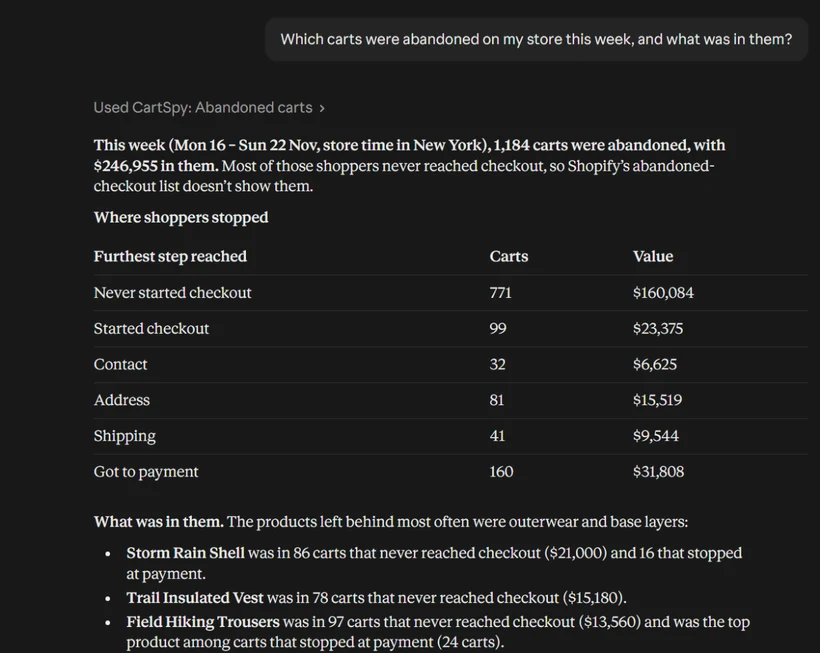
"How did carts do yesterday?"
224 carts worth $45,455, 93 checkouts and 29 orders ($5,592.29). 194 carts were abandoned. That is 25 fewer carts than the day before, while the cart-to-order rate rose from 12.4% to 12.9%.
"Where do shoppers leave checkout this week?"
609 checkouts started and 166 were completed (27.3%). The biggest drop is between payment and the order: 51.2% of the 340 shoppers who reached payment went no further. On phones, 27.6% leave between address and shipping, against 18.2% for the store.
"Which campaigns fill carts but don't sell?"
Facebook "retargeting-dpa-30d": 54 carts and 5 orders, a 9.3% cart-to-order rate against 11.6% for the store, with 45 abandoned carts worth $8,656. Shoppers arriving from ChatGPT did the opposite: 63 carts and 15 orders, 23.8%.
"Which products get removed from carts most?"
Field Hiking Trousers: removed 33 times out of 205 adds (16.1%). Merino Base Layer Crew: 27 out of 198 (13.6%).
"What should I restock?"
Expedition 65L Pack: 63 views while sold out, on 6 days, an estimated $2,886 in cart value missed. Camp Mug 350ml: 18 views on 3 days. The cart value is an estimate.
"Which products are left in carts together?"
Summit Hooded Down Jacket with Trail Insulated Vest: left together in 7 abandoned carts worth $3,975, bought together once.
"What did the shopper from Brisbane do?"
Came from a TikTok ad, viewed Field Hiking Trousers, added them to cart a minute later, then went through contact, address, shipping and payment in checkout for $139.55.
Every answer also carries a link that opens the same view in CartSpy.
Nothing to set up. Once CartSpy is installed, open Sidekick in your Shopify admin and ask about your carts.
https://app.cartspy.app/mcp and name it CartSpy.In ChatGPT, custom connections sit under Settings › Apps › Advanced › Developer mode. Paste the same address and approve it in your Shopify admin.
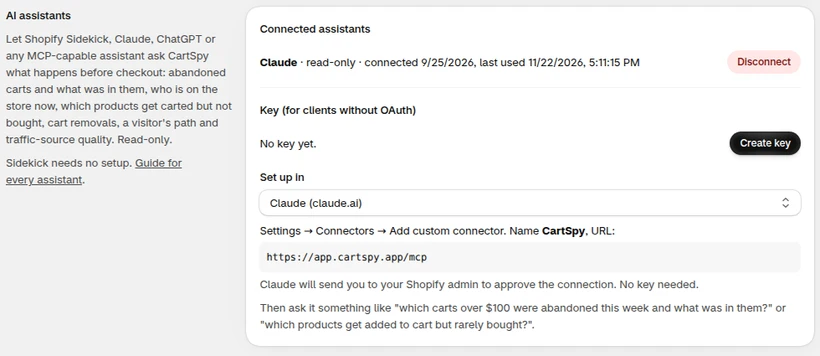
Any assistant that can connect to an MCP server can use the same address. For tools that take a key instead, create one in CartSpy › Settings › AI assistants. That page also lets you remove a key or a connection at any time.
Yes. With CartSpy installed, connect it to Claude or ChatGPT and ask in plain words, for example which carts over $300 were abandoned this week, or which traffic source sends shoppers who leave before paying. The answers come from your store's own cart data.
CartSpy does, for what happens before checkout: carts, abandoned carts, checkout steps, traffic sources and campaigns. The connection is read-only and covers one store.
Yes. CartSpy's read-only connection for Claude, ChatGPT and other assistants is an MCP server at https://app.cartspy.app/mcp. It answers questions about carts, abandoned carts, checkout steps and traffic sources for one store, and changes nothing.
Yes. Once CartSpy is installed, Sidekick in your Shopify admin can ask it about your carts with nothing to set up. Two reports, sold-out demand and site search, are answered in Claude and ChatGPT only.
No. Every answer is read-only. The assistant can read your CartSpy data for one store and nothing else, and you can remove the connection at any time in CartSpy's settings.
Every CartSpy plan can be connected. Sold-out demand and site search answers need the Advanced plan ($19.99 a month), the same as in the app.
Install CartSpy and connect your assistant. 7-day free trial, cancel any time.
Start free trial