CartSpy
Guide · Live View

Shopify Live View not working? Common causes

In short: Live View usually works but shows less than you expect: only the last 5 to 10 minutes, no shoppers who declined cookies, and delays of up to 2 hours. To see carts shopper by shopper, with history, use CartSpy.


Built for Shopify Built for Shopify

Common causes, from Shopify's own help pages

  1. The window is short. "Visitors right now" means visitors active in the past 5 minutes. Active carts, checking out and purchased cover the last 10 minutes. A quiet minute can look like zero. Shopify Help: Live View
  2. A processing delay. Live View can show "There's a delay, but your live data will appear soon". Shopify says this typically resolves within 1 to 2 hours. Shopify Help: Live View
  3. Cookie banners. Where a cookie banner is active, Shopify collects data from visitors in those regions only after they consent. Visitors who ignore or decline it are not counted. Shopify Help: customer discrepancies
  4. Bots and VPNs. Most bots are filtered out. Visits Shopify can't place, such as search engine bots, automated services and VPNs, can show up in Kansas on the map. Shopify Help: Live View
  5. An app or script resets the session cookie. Each new value counts as a separate session, so sessions go up and conversion rate goes down. Shopify Help: session cookie rotation
  6. Your own visits. Opening the store on desktop with "View store" in the admin doesn't count as a session. Any other way of opening it on desktop does. Shopify Help: customer discrepancies
  7. The map is in the wrong place. This happens when Google Maps can't verify your store address; check the address in your store settings. Shopify Help: Live View
  8. Shopify changed how sessions are measured. After an update in September 2026, sessions and conversion rate may differ from earlier periods. Shopify Help: session measurement update

If none of these fit and Live View still shows nothing while orders come in, contact Shopify Support.

Need more than Live View?

Live View is a pulse of the store: how many people, roughly where, and short-window counts. It doesn't show what each shopper is doing or keep the carts they leave. CartSpy, an app for Shopify, records each shopper's adds to cart, checkouts and orders and keeps them.

Every cart, shopper by shopper

Each shopper who adds to cart, checks out or orders gets a card with the product, the cart total, city, device and where they came from.
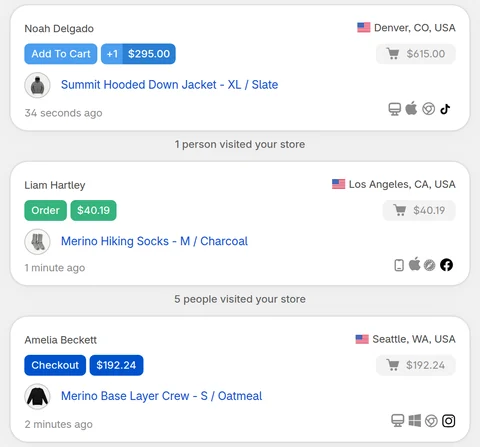
CartSpy Live View cards: each shopper's action, product, cart value, city, device and traffic source, with visitor counts between them
An add to cart from TikTok in Los Angeles, an order from Facebook and a checkout from Instagram in Sydney. From the CartSpy demo store.

Abandoned carts, before checkout

Shopify's abandoned checkouts start once a shopper reaches checkout. Most shoppers leave earlier. CartSpy keeps those carts too, with their value, items, how far the shopper got and where they came from.
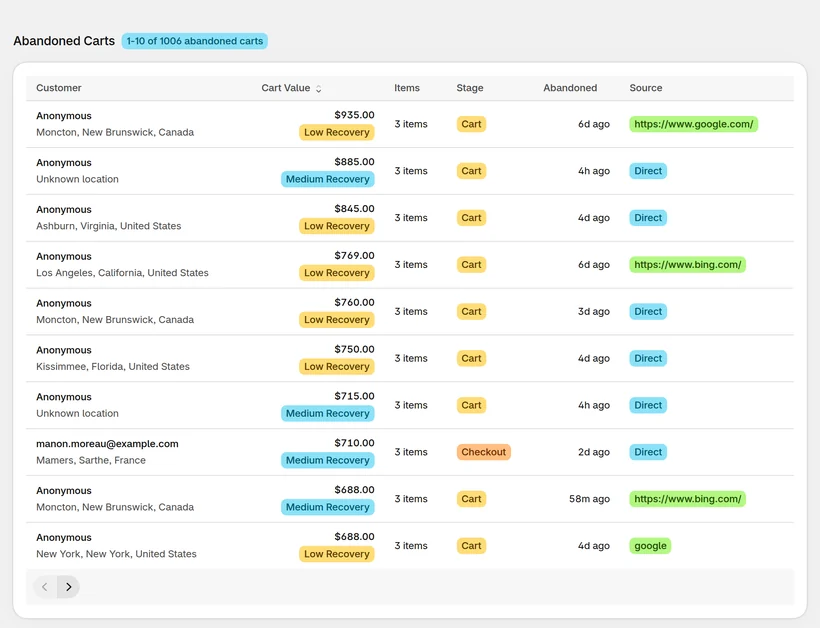
CartSpy's Abandoned Carts table: carts with location, value, items, the stage reached (cart or checkout), when they were left and the source
Abandoned carts with the stage each shopper reached: most left at the cart, before checkout. From the CartSpy demo store; emails blurred.

Products removed from carts

When a shopper takes something out of the cart, it shows as its own card, with the product, the amount and what is left in the cart. CartSpy also counts removals per product, so the items people hesitate over stand out.
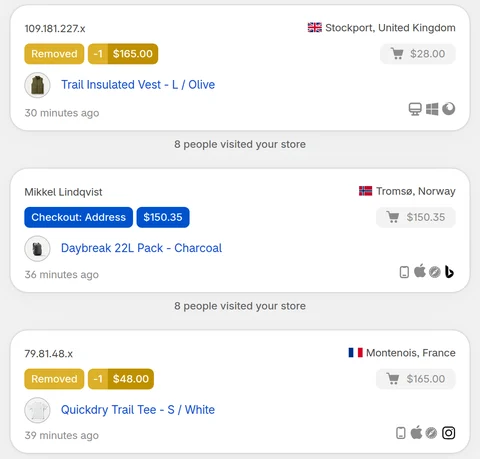
CartSpy Live View: two Removed cards, a Trail Insulated Vest and a Quickdry Trail Tee taken out of carts, with a checkout card between them
Two shoppers remove a product from their cart, with a checkout in between. From the CartSpy demo store.

Cart quality per traffic source

Which sources and campaigns send shoppers who add to cart, and which of them go on to order.
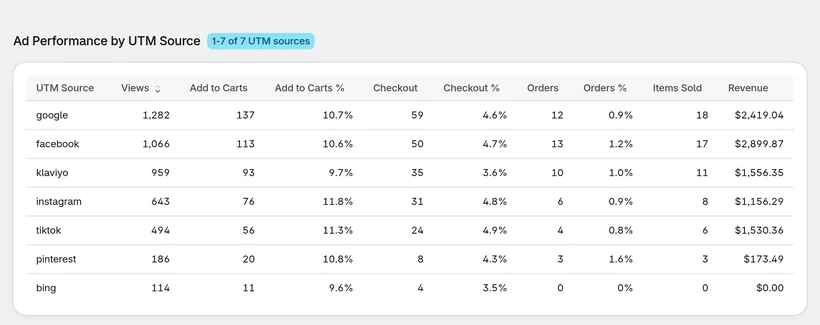
CartSpy Ad Performance by UTM Source: views, adds to cart, checkouts and orders with rates for google, facebook, klaviyo, instagram, tiktok, pinterest and bing
Views, adds to cart, checkouts and orders per source. From the CartSpy demo store.

CartSpy doesn't replace Live View; many stores keep both open. It is not a session recorder either: you see what shoppers did, not a video of their screen.

Questions about Shopify Live View

Why does Shopify Live View show visitors but no add to carts?

Live View's customer behavior numbers cover only the last 10 minutes, and visitors only the last 5. A shopper who added to cart 15 minutes ago no longer shows. In regions with a cookie banner, visitors who have not accepted are not counted either.

Why does Live View say there's a delay?

Shopify shows "There's a delay, but your live data will appear soon" while data is being processed. Its help page says this usually clears within 1 to 2 hours.

Why are so many Live View visitors in Kansas?

Shopify's help page explains that visits it can't place, such as search engine bots, automated services and VPNs, can show up in the middle of the United States.

What is a better alternative to Shopify Live View that shows what each visitor is doing?

For each shopper's cart, use a cart app such as CartSpy. It lists every shopper who adds to cart, checks out or orders, with the products, location, device and traffic source, and keeps the carts they leave.

More guides

See every cart, not just a count

Install, and each cart appears with its shopper as it happens. 7-day free trial, cancel any time.

Start free trial