Help center › How things work
Live View shows shoppers one by one. The Analytics page adds them up over a date range: per product, per traffic source and campaign, per search and per abandoned cart. The Exports page downloads the same data as CSV files.
Pick today, yesterday, the last 7, 30 or 90 days, the last 365 days (Advanced and Pro), or a custom range at the top of the page. How far back you can go depends on the plan: 90 days on Essential, 365 days on Advanced and 730 days on Pro. A range that starts before you installed CartSpy shows a note, because there is no data from before the install.
Above the tabs, a chart splits the value of carts by traffic source for the same dates; switch it to checkouts or orders with the buttons above it.
| Tab | What it lists | Plan |
|---|---|---|
| Product Performance | Views, add to carts, checkouts, orders, items sold and revenue per product | All plans |
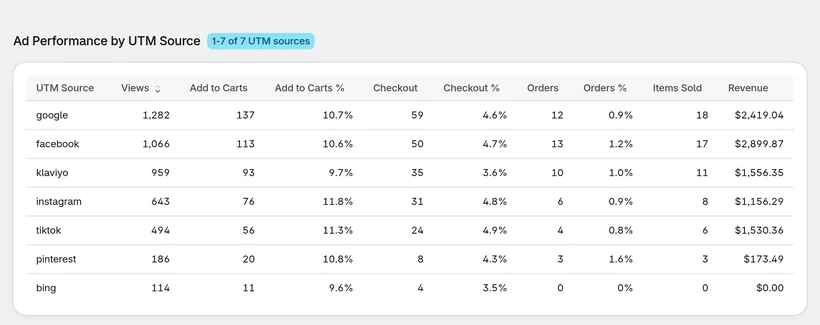
| Ad Performance | The same counts per UTM source, or per UTM campaign; visits without UTM tags are Direct | All plans |
| Referrers | The same counts per referring site | All plans |
| Abandoned Carts | Each cart left without an order; see abandoned carts | All plans |
| Top Searches | What shoppers type in your store's search: searches, unique users, results, conversion rate, average session time | Advanced |
| Out of Stock | Products viewed while sold out, with the number of views | Advanced |
| Broken Links | Pages that returned "not found" (404), with views | Advanced |
| Bot Traffic | Bots by name, with hits, pages visited and when last seen | Advanced |
A tab your plan doesn't include shows a lock. Whether a product counts as out of stock when one variant is sold out, or only when all are, is set in Settings › Out of Stock Detection.
In Product Performance, click a product to see its funnel: views, then added to cart, checkout started and order completed, with the share at each step. Orders paid with Shop Pay, Apple Pay or a similar button skip the checkout steps, and the funnel says how many did.
Why products get carted but not bought: products added to cart but not bought.
Open Exports, choose the export type and click Download CSV. Essential includes the Product Performance export; every other export comes with Advanced.
Tick Exclude customer data to leave out names, emails, IP addresses and detailed locations and to anonymize visitor IDs in that export.
Email support@cartspy.app with the tab or export and the date range whose numbers look wrong.