Help center › How things work
CartSpy lists every cart that had products in it and didn't become an order, including carts that never reached checkout. You find them in Analytics › Abandoned Carts, in the daily email, and as CSV exports.
This is wider than Shopify's own abandoned checkouts, which start only once a shopper reaches checkout. The difference is explained in abandoned cart vs abandoned checkout.
Each row shows the Customer (a name or email when the shopper was signed in or typed one at checkout, otherwise Anonymous, with the location), the cart value, the number of items, the stage, when it was left and the Source that brought the shopper.
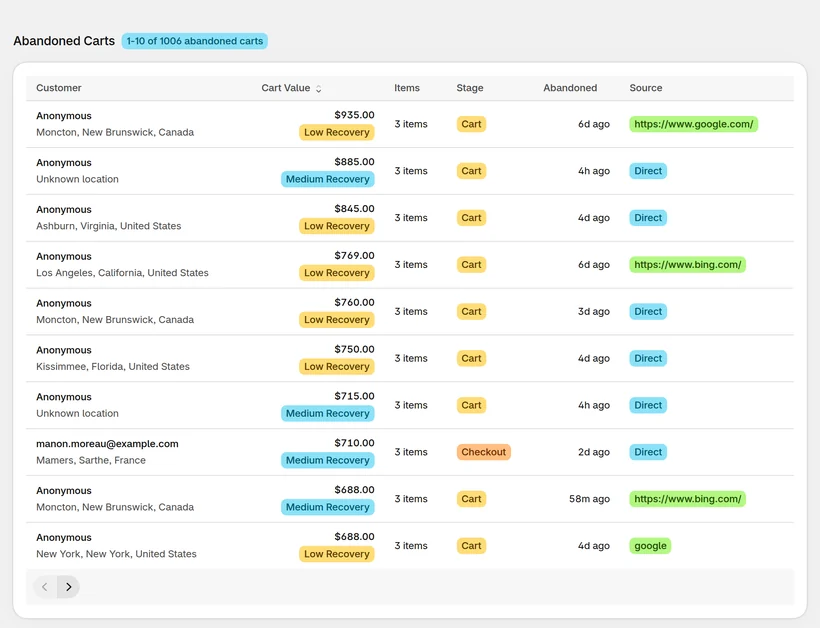
| Stage | The shopper's last step |
|---|---|
| Cart | Added to cart but never started checkout. |
| Checkout | Started checkout, or filled in contact, address or shipping, then left. |
| Payment | Submitted payment details, and no order followed. |
| Unknown | CartSpy couldn't tell the last step. |
To see where shoppers drop off across many carts, step by step: where shoppers leave before checkout.
Under each cart value, a badge tells you which carts are most worth a follow-up:
Older carts get no badge.
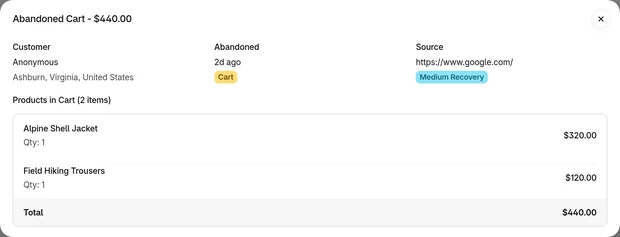
Click a row to open the cart: the customer and location, how long ago it was left and at which stage, the source, and every product with its quantity and price, with the total.
On the Exports page (all exports except Product Performance need the Advanced plan):
CartSpy itself never contacts your shoppers. Yesterday's abandoned carts also arrive each morning in the daily email report.
Email support@cartspy.app with the date of the abandoned cart and its value, and we'll look it up.